← All Projects
AI Product Design Case Study

Nutshell

Designing a privacy-first AI meeting assistant that turns conversations into searchable, actionable insights — without sending anything to the cloud.
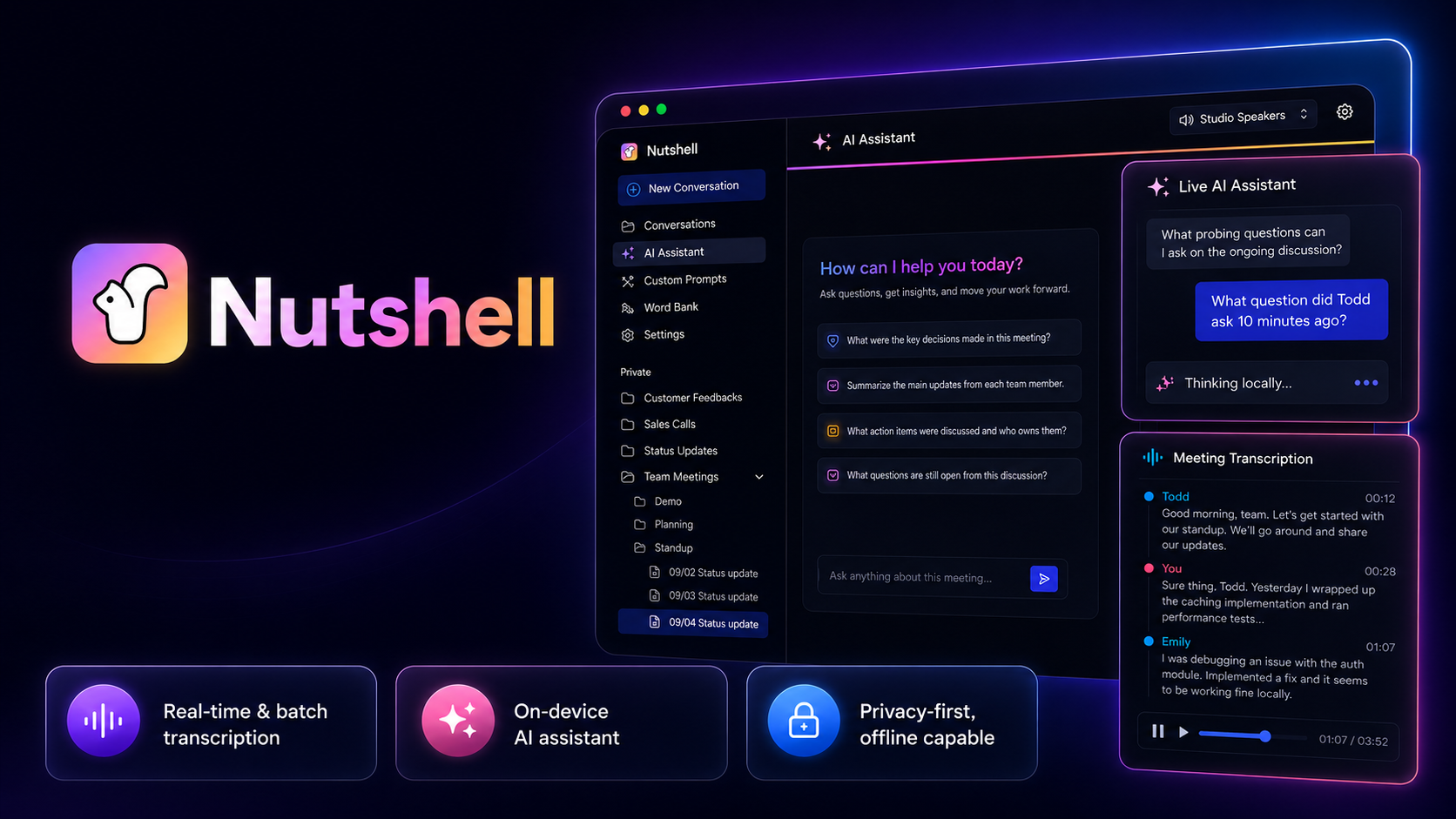
Why this mattered: Privacy-first AI is easy to say and hard to design. On-device processing isn't just a technical spec — it's a product commitment that shapes every interface decision, from how a loading state is phrased to how the consent reminder fits into the workflow.
Role Product Designer / System Analyst
Timeline Oct 2024 – May 2025
Focus UX/UI · AI Interaction · Product Strategy
Project Snapshot
Problem Meeting conversations produce valuable information that disappears into memory, scattered notes, or recordings no one replays.
My Role Product Designer and System Analyst — UX/UI, AI interaction model, prompt system, and privacy-first product messaging.
Key Users Professionals in meeting-heavy roles who need better recall, faster context recovery, and clear post-meeting action.
Constraints All AI processing on-device. No meeting data sent to external servers. Must function offline by design.
Key Contribution Transcript layout, AI assistant interaction model, custom prompt flows, and consent-first recording reminders.
Outcome A coherent AI meeting workspace where local processing is a visible, trustworthy product feature — not just an architectural detail.

Meeting conversations disappear. The tools for capturing them create new problems.

Every meeting produces information that feels important in the moment and is hard to find an hour later. Decisions get made without being recorded. Context is shared and forgotten. Action items drift into informal notes across different apps. Recordings exist but feel too long to actually replay.

The conventional solution — cloud-based AI transcription — introduced its own problem. Many conversations happen in sensitive contexts: medical discussions, legal strategy, financial planning, HR reviews. Sending those recordings to a third-party server creates risk that the participants never explicitly consented to.

The core tension: Users needed a smarter way to capture and recall meetings — but the most capable tools required giving up the privacy of the conversations they were trying to remember.

What users were experiencing

Context disappearing after calls Scattered notes across apps Recordings that never get replayed No reliable way to find past decisions Action items lost without clear owners

Why existing tools fell short

Cloud transcription raised privacy concerns AI summaries disconnected from actual words No searchable context tied to live moments Generic outputs, not meeting-specific answers

Most meeting AI products had to choose between capability and privacy. Nutshell didn't.

Local-first AI was maturing at exactly the moment users were growing more skeptical of cloud-based transcription. The timing created a product opportunity: build an AI meeting assistant that could do everything cloud tools could do — transcription, summaries, searchable recall, action items — without ever sending the recording to a remote server.

The user problem wasn't just "I need transcription." It was "I need transcription I can actually trust with my conversations." Those are different design briefs.

"The strongest privacy product decisions aren't technical. They're interface decisions — where privacy becomes something the user can see and trust, not just something an engineer claims about the backend."

Nutshell's job was to make on-device processing legible. Not just architecturally correct — visibly trustworthy. That distinction shaped every design decision in the product.

Most of the pain happens after the meeting — when context has already faded.

I mapped the full meeting lifecycle: the preparation, the live session, and the aftermath. The key finding was that users weren't struggling during the meeting. They were struggling 30 minutes afterward — when action items had blurred, decisions couldn't be sourced, and the recording felt too long to help.

I also identified a trust gap in how users understood "local AI." Without any baseline expectation for what on-device processing looked like, users had no mental model for how their data was being handled. "On-device" was an engineering claim, not a user experience.

Key insight: "Thinking locally…" needed to be a visible UI state — not a footnote in the privacy policy. The product's architecture needed to become part of its interface language.

User needs surfaced

Live scanning of long conversations Questions answered from actual meeting content Repeatable outputs for recurring meeting types Confidence that data isn't leaving the device Ethical defaults for recording consent

Constraints I designed around

Local model latency ≠ cloud API speed Processing varies by device capability No connection errors (fully local) Offline must be the default, not an edge case AI grounded only in active transcript

Five passes — from workflow map to finished interaction system.

Map the meeting lifecycle

Documented what actually happens before, during, and after a meeting — where information surfaces, where it disappears, and where the real friction lives. Found that post-meeting recall, not live note-taking, was the highest-pain moment.

Define the privacy constraints

Worked with engineering to understand the full data flow: audio in → on-device transcription → local LLM → structured output. Each step had a failure mode that needed a design response. No cloud calls. Offline by default. Local model latency treated as a UI state, not a bug.

Design the transcript experience

Focused on readability under pressure — a transcript users could scan during a live meeting without losing the thread. Speaker labels, timestamps, and visual separation were designed for quick orientation, not archival completeness.

Build the AI interaction model

Positioned the AI assistant beside the transcript — not above it, not in a separate tab. The design principle was "companion, not replacement." Users ask questions in natural language; the assistant grounds every answer in the active meeting. General-knowledge responses were excluded by design.

Layer consent and prompt patterns

Added a consent reminder that fires before every transcription session — not buried in settings. Built a slash-command system that lets users save reusable prompts for recurring meeting types. Both features were designed around ethical defaults: consent is visible, and prompt friction is low enough that good behavior is the path of least resistance.

Five decisions that shaped the product experience.

Side-by-side layout
Decision Keep transcript and AI assistant visible at the same time, in the same view.
Reason Users need transcript context when asking questions during live meetings — switching between views breaks the flow.
Tradeoff Each panel gets less screen space; the layout becomes more information-dense.
Result Meeting context stays present throughout the session, reducing scroll-back and context switching.
Local processing as UI
Decision Make on-device processing a visible interface state, not a hidden technical property.
Reason Users cannot trust a privacy claim they cannot see or verify in the product they're using.
Tradeoff Required adding status indicators, explainer microcopy, and deliberate UI states for processing.
Result "Thinking locally…" became a trust signal — something the user could point to and explain to a colleague.
Slash-command prompts
Decision Let users build reusable prompt templates with slash commands (/summarize, /extract, /find).
Reason Most meeting types have predictable outputs. Rewriting prompts from scratch every session is unnecessary friction.
Tradeoff Users need to discover the pattern before it saves time — discoverability requires its own design work.
Result Repeatable meeting outputs became one-keystroke workflows instead of written-from-scratch prompts.
Consent-first recording
Decision Show a disclosure reminder before every transcription session — not buried in settings or shown once at onboarding.
Reason Many jurisdictions require participant consent for recorded conversations. Users may forget with recurring use.
Tradeoff Adds friction at the start of every session, which some users will find repetitive.
Result A product that defaults to ethical behavior — consent is part of the workflow, not an afterthought.
Transcript as ground truth
Decision Ground all AI responses exclusively in the active meeting transcript — no general-knowledge fallback.
Reason Generic AI responses in a meeting context create confusion and erode trust in the product's outputs.
Tradeoff The AI cannot answer questions about topics not discussed in the meeting — which may frustrate some users.
Result Users can trust that every answer refers to something actually said in the meeting — not something invented.

Three interconnected features. One focused meeting workspace.

The product isn't three separate features. It's a single workspace where transcription, AI questions, and reusable prompts reinforce each other. You're in the transcript reading what was said. You ask a question in the assistant beside it. You use a slash command you set up for your standup meeting type. These actions flow between each other without mode-switching.

Intelligent Transcript — Speaker-labeled, timestamped, and designed for live scanning. The layout keeps the most recent speech at the visual center, reducing the need to scroll during fast-moving conversations. Users can copy any segment and reference it directly in an AI question.
Live AI Assistant — Positioned beside the transcript, not above it. Every response is sourced from the active meeting only. The prompt field stays visible throughout the session so asking a question feels like a quick aside, not a mode change. Processing status ("Thinking locally…") is always visible.
Custom Prompts — A slash-command system that surfaces reusable templates when the user types "/". Templates are organized by meeting type — standup, sales call, planning session, one-on-one. The system learns which prompts a user reaches for most and surfaces them first.
"The consent reminder is the most deliberate friction in the product. It's the one place where making something slightly harder was the right design decision."

The on-device architecture created design constraints that cascaded through the entire interface.

Local models have different latency profiles than cloud APIs. Processing speed varies by device. The UI needed to handle extended processing states without making the product feel broken. These weren't edge cases — they were the baseline operating conditions I designed around.

I worked with engineering to understand the full data flow: audio in → on-device transcription → local LLM processing → structured response out. Each step has a failure mode that needed a design response. No connection error (the system is fully local). A transcript that lags. A model that's still loading on startup. Designing around these realities made the product more honest about what it could and couldn't do.

System components I designed around

On-device audio capture Local transcription engine LLM context window management Prompt scaffolding logic Session state persistence Response evaluation layer Saved prompt templates Consent state tracking

Interface states I designed for

Model loading on first launch Transcript lag during fast speech Long AI processing time Session resume after interruption No prior transcript (batch upload) Prompt not matching meeting content

What the design made possible.

Nutshell became a strong product design project because it connected AI interaction design, privacy-first strategy, and practical meeting workflows. The design work translated complex local AI capabilities into an interface that felt understandable, useful, and trustworthy.

Clearer meeting review

Transcript design that makes long conversations scannable during and after the meeting.

Faster context recovery

AI assistant grounded in the actual meeting — users get answers, not hallucinations.

Privacy made legible

"Thinking locally…" became a trust signal users could see, explain, and rely on.

Less prompt friction

Slash commands turned repeatable outputs into one-keystroke actions for regular meeting types.

Responsible by default

Consent reminders built into the recording workflow — not optional, not buried in settings.

What this project taught me about designing for local-first AI.

Designing for local-first AI is a different discipline than designing for cloud AI. The constraints are real, the latency profile is different, and the trust model requires explicit UI work that most cloud products can skip. Privacy becomes a product feature when the interface makes it visible and legible — not when the backend documentation says so.

The strongest moment in this product was the consent reminder. It's the one place where deliberately slowing the user down was the right design decision. That friction exists to protect the user's relationships with the people in the meeting. Getting that decision right required thinking about the product's ethics, not just its usability.

Custom prompts for new users: The slash-command system was designed for users who already know what they want from a meeting. A future version would include a prompt discovery experience that teaches users which prompts work before they're expected to build their own.
Source-backed answers: Linking AI responses to specific transcript moments would let users verify answers and jump to the source — closing the trust loop between question and evidence.
Meeting-type templates: Pre-built transcript + prompt configurations for standup, sales call, planning session, and retrospective would reduce setup time for users with recurring meeting patterns.