AI Compass
Helping people think with AI, not just use it. A guided decision-making experience designed to turn vague goals into confident, actionable direction.
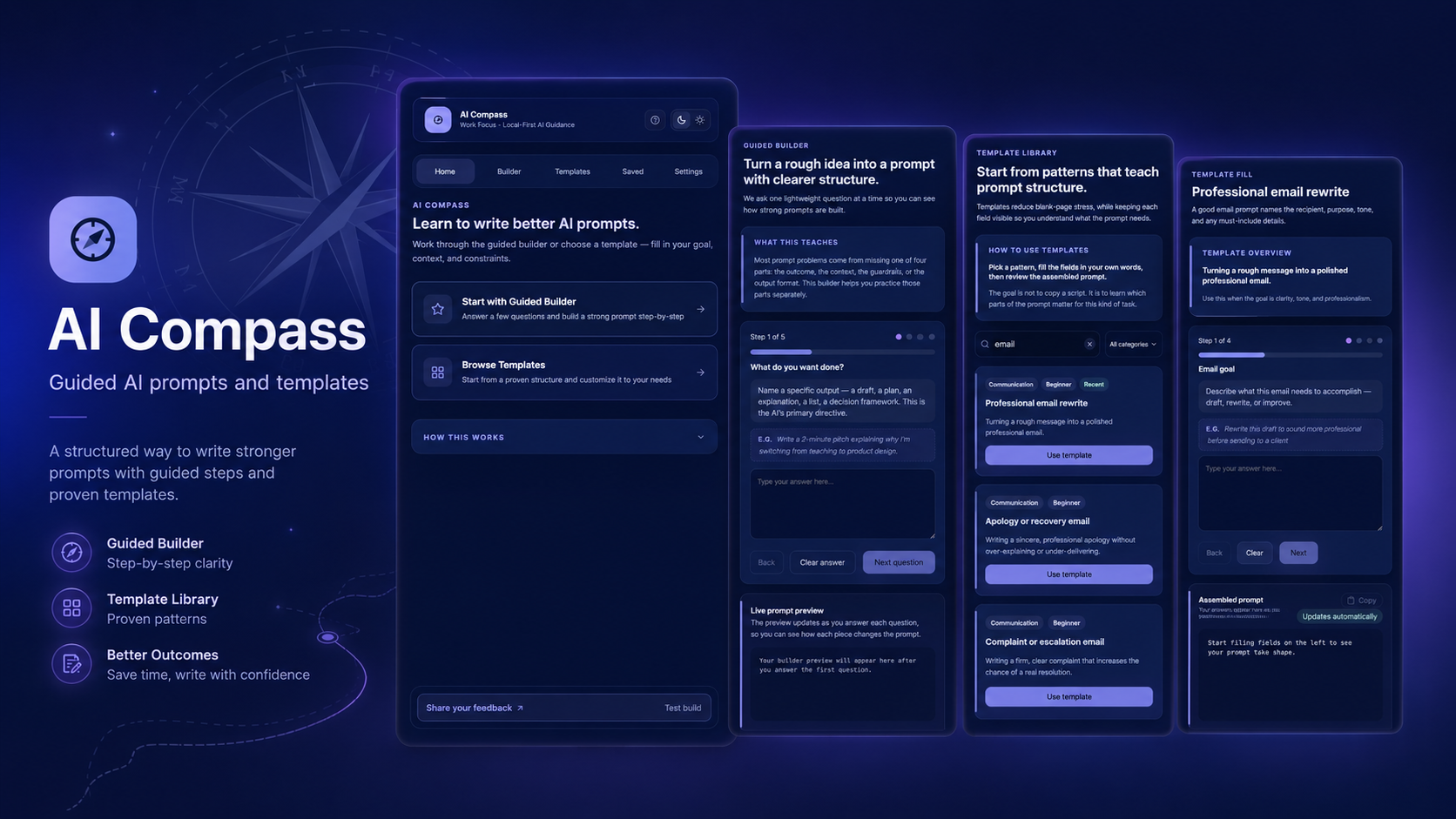
Most people use AI the way they used early search engines hoping the query will somehow do the thinking.
The result is scattered chat threads with no durable structure, responses accepted without validation, and outputs that feel vague rather than useful. Users get something back, but they're not sure whether it's right, whether they asked the right question, or what to actually do with it now.
The problem is not that AI can't help. It's that the interface provides no guidance on what to ask, no structure for evaluating what comes back, and no path from response to decision. The blank prompt field is the most honest symbol of this gap: powerful technology, zero direction.
What users experience
What the tools fail to provide
The next wave of AI products shouldn't just be more capable. They should make users more capable.
AI adoption is widespread. AI literacy is not keeping pace. Most people don't need another AI tool, they need a better way to think through what they're trying to do before they involve AI at all. The interface is the guidance. If the interface doesn't help users clarify their goals, they'll keep getting outputs that don't land.
AI Compass was built around the belief that the most valuable thing an AI product can do isn't give a faster answer, it's help the user ask a better question. That's a different design brief than most AI products are working from.
Good AI UX reduces cognitive fog, it doesn't add another dashboard. The best AI product for most users isn't the most powerful one. It's the one that helps them understand what they're actually trying to solve.
Defined less by who they are, but more by where they're stuck.
AI Compass isn't for a specific demographic. It's for a specific user state, the moment when someone knows they want to use AI but doesn't know where to start, or has gotten an AI response and doesn't know what to do with it. That moment is more universal than any persona description can capture.
A decision loop, not a chat thread. Seven steps from vague goal to confident direction.
The core product concept is a structured process that guides users through a decision instead of dropping them into a prompt field. Each step builds on the last. The system holds context so users don't have to re-explain themselves at every turn.
Clarify the goal
Define what you're actually trying to figure out before anything else happens. The system doesn't let users skip this step because vague input produces vague output.
Understand the context
Surface constraints, prior knowledge, and background that shapes the problem. Guided intake questions pull out what the user knows and what they don't.
Generate possible paths
Explore multiple approaches instead of defaulting to the first answer. Three structured options force comparison and prevent passive acceptance of the obvious path.
Evaluate tradeoffs
Compare effort, risk, and outcome across each option before choosing. The system surfaces the assumptions baked into each path so the user can challenge them.
Choose a direction
Select a path with documented reasoning you can return to later. The decision and the rationale behind it are captured together, not just the outcome.
Turn it into action
Convert the decision into next steps, prompts, or a working plan. The session ends with something the user can actually do, not just something they understand.
Save the learning
Archive useful decisions and frameworks as reusable artifacts. The product gets more valuable over time as the user's decision history accumulates.
Six passes: from problem framing to interaction model.
Identify the real barrier
Started by separating the access problem (do users have AI tools?) from the literacy problem (can users use them well?). Found that access was broadly solved; direction and confidence were not.
Map current AI user experience
Documented what actually happens when users open an AI tool, the blank prompt, the trial-and-error prompting, the unvalidated response, the stuck user who doesn't know if the answer is good. Identified each moment where direction was missing.
Design the decision loop
Built the seven-step framework from first principles: what does a good decision process look like, and how much of it can the interface support without becoming a burden? Each step was evaluated against one question: does this help the user, or does it help the system feel complete?
Define the interaction model
Designed guided intake to feel like a structured conversation, not a form. Tested the line between "enough structure to be helpful" and "so much structure it feels like homework." Progressive disclosure was the main tool for managing this balance.
Build the prompt scaffolding
Designed the system that translates user input into structured, context-aware prompts. The goal was to help users learn and feel more confident prompting through the guided process.
Design for trust
Added the assumption visibility layer, surfacing what the AI is taking for granted before the user moves forward. Designed the tradeoff comparison view so options feel genuinely comparable, not artificially different. Both were about giving users the tools to evaluate, not just receive.
Four decisions that defined how the product thinks about user agency.
Four principles behind every interface decision. Six features that deliver them.
The interface needed to feel calm and intelligent not like a productivity app with too many moving parts, and not like a chatbot pretending to be something smarter. The design principles drove every specific feature decision.
UX principles
Features that deliver them
Each feature targets a specific failure mode in how users currently interact with AI. None of them are about making the AI more powerful, they're about making the user more capable.
AI Compass is not just screens. It's an information architecture.
The visible interface is the surface layer. Below it, a structured information flow determines how goals get classified, how options are scaffolded, how responses are evaluated, and how decisions become reusable. This is where my background in UX, data systems, workflow design, and systems thinking applies directly.
I don't just design what users see. I think about how information moves through a system, how decisions cascade, and how the structure should behave when the edge case arrives.
System components
What this connects to
This is the same systems thinking that I applied in healthcare data work, mapping information flows, identifying where data breaks down, designing around edge cases, and building structures that support real behavior instead of assumed behavior.
The difference between a well-designed AI experience and a bad one is often not the model. It's the architecture around it.
What a well-designed AI decision experience should make possible.
AI Compass is a product concept, not a shipped product. The outcomes below describe what the design was built to enable what should get better when the system works as intended.
Reduced blank prompt anxiety
Structured intake replaces the intimidating empty field with a guided conversation that anyone can start.
Better decision framing
Multiple pathways prevent the first-answer trap, users compare options instead of defaulting to the obvious path.
Increased output trust
Assumption visibility lets users validate before acting, and gives them something to push back against when the AI is wrong.
Faster path to action
Action plan generation at the end of each session closes the loop between response and next step.
Reusable thinking
Session artifacts accumulate into a personal decision archive, the product gets more valuable with use.
What designing AI Compass taught me about what AI UX should actually become.
AI Compass challenged me to design past the chat interface, the thing most AI products are built around, and think about what it would mean to design the system that supports thinking, not just the widget that generates output. That's a more interesting design problem, and a harder one.
The project connected directly to my background in systems thinking, data workflows, and product design. The invisible infrastructure: intent classification, prompt scaffolding, assumption extraction, session artifacts is what makes the visible interface trustworthy. You can't design the surface without understanding the system underneath it.